
171 lines
7.2 KiB
Plaintext
171 lines
7.2 KiB
Plaintext
---
|
|
title: "bun --filter"
|
|
description: "Select packages by pattern in a monorepo using the --filter flag"
|
|
---
|
|
|
|
The `--filter` (or `-F`) flag selects packages in a monorepo by pattern. A pattern is a package name glob, a `./path` glob, a `{dir}` directory selector, or a `...` dependency relation.
|
|
|
|
The flag works with `bun run`, `bun install`, `bun add`, `bun remove`, `bun update`, `bun outdated`, `bun prune`, and `bun pm licenses`. For package-manager commands, put the flag after the subcommand (`bun install --filter api`), since `bun --filter <pattern> <word>` runs `<word>` as a script.
|
|
|
|
---
|
|
|
|
## Matching
|
|
|
|
### Package Name `--filter <pattern>`
|
|
|
|
Name patterns select packages by the `name` field in `package.json`. For example, if you have packages `pkg-a`, `pkg-b` and `other`, you can match all of them with `*`, only `pkg-a` and `pkg-b` with `pkg*`, and a specific package with its full name.
|
|
|
|
### Package Path `--filter ./<glob>`
|
|
|
|
Path patterns start with `./` and select all packages in directories matching the pattern. For example, to match all packages in subdirectories of `packages`, use `--filter './packages/**'`. To match the package in `packages/foo`, use `--filter ./packages/foo`.
|
|
|
|
Name patterns match the full package name (`core` does not match `@acme/core`; use `@acme/*`), and `*` does not cross `/`. Path patterns must match the workspace directory itself: `./packages` selects nothing, `./packages/*` selects every workspace directly inside it.
|
|
|
|
### Directory `--filter '{<dir>}'`
|
|
|
|
A directory in braces selects every workspace in that directory or anywhere below it, resolved from the current directory. `--filter '{packages}'` selects everything under `packages/`; `--filter '{.}'` selects the current directory's workspace and everything below it.
|
|
|
|
### Dependency relations `--filter 'foo...'`
|
|
|
|
Adding `...` to a pattern also selects workspaces related through workspace dependencies:
|
|
|
|
| Pattern | Selects |
|
|
| --------- | -------------------------------------------------------------------- |
|
|
| `foo...` | `foo` and the workspaces it depends on, directly or transitively |
|
|
| `foo^...` | only the workspaces `foo` depends on, not `foo` itself |
|
|
| `...foo` | `foo` and the workspaces that depend on it, directly or transitively |
|
|
| `...^foo` | only the workspaces that depend on `foo`, not `foo` itself |
|
|
|
|
`foo` can be a name glob or a directory selector (`...{./packages/api}`). To exclude, `!` goes first: `--filter '!...foo'`.
|
|
|
|
```bash terminal icon="terminal"
|
|
bun install --filter 'web...'
|
|
bun add zod --filter '...^ui'
|
|
bun outdated --filter '{./packages/apps}'
|
|
```
|
|
|
|
---
|
|
|
|
## `bun install` and `bun outdated`
|
|
|
|
By default, `bun install` installs dependencies for every package in the monorepo. To install dependencies for specific packages, use `--filter`.
|
|
|
|
Multiple `--filter` flags combine: everything matched by a positive pattern, minus everything matched by a `!` pattern. A pattern that matches nothing prints a warning. For `bun add`, `bun remove`, `bun update`, `bun prune`, and `bun pm licenses`, selecting no workspaces at all is an error.
|
|
|
|
Given a monorepo with workspaces `pkg-a`, `pkg-b`, and `pkg-c` under `./packages`:
|
|
|
|
```bash terminal icon="terminal"
|
|
# Install dependencies for all workspaces except `pkg-c`
|
|
bun install --filter '!pkg-c'
|
|
|
|
# Install dependencies for packages in `./packages` (`pkg-a`, `pkg-b`, `pkg-c`)
|
|
bun install --filter './packages/*'
|
|
|
|
# Save as above, but exclude the root package.json
|
|
bun install --filter '!./' --filter './packages/*'
|
|
```
|
|
|
|
Similarly, `bun outdated` displays outdated dependencies for all packages in the monorepo, and `--filter` restricts the command to a subset of them:
|
|
|
|
```bash terminal icon="terminal"
|
|
# Display outdated dependencies for workspaces starting with `pkg-`
|
|
bun outdated --filter 'pkg-*'
|
|
|
|
# Display outdated dependencies for only the root package.json
|
|
bun outdated --filter './'
|
|
```
|
|
|
|
See [`bun install`](/pm/cli/install) and [`bun outdated`](/pm/cli/outdated).
|
|
|
|
---
|
|
|
|
## Running scripts with `--filter`
|
|
|
|
Use the `--filter` flag to execute scripts in multiple packages at once:
|
|
|
|
```bash terminal icon="terminal"
|
|
bun --filter <pattern> <script>
|
|
```
|
|
|
|
Say you have a monorepo with two packages: `packages/api` and `packages/frontend`, both with a `dev` script that starts a local development server. Normally, you would open two terminal tabs, `cd` into each package directory, and run `bun dev`:
|
|
|
|
```bash terminal icon="terminal"
|
|
cd packages/api
|
|
bun dev
|
|
|
|
# in another terminal
|
|
cd packages/frontend
|
|
bun dev
|
|
```
|
|
|
|
Using `--filter`, you can run the `dev` script in both packages at once:
|
|
|
|
```bash terminal icon="terminal"
|
|
bun --filter '*' dev
|
|
```
|
|
|
|
Both scripts run in parallel, and a terminal UI shows their respective outputs:
|
|
|
|
<Frame>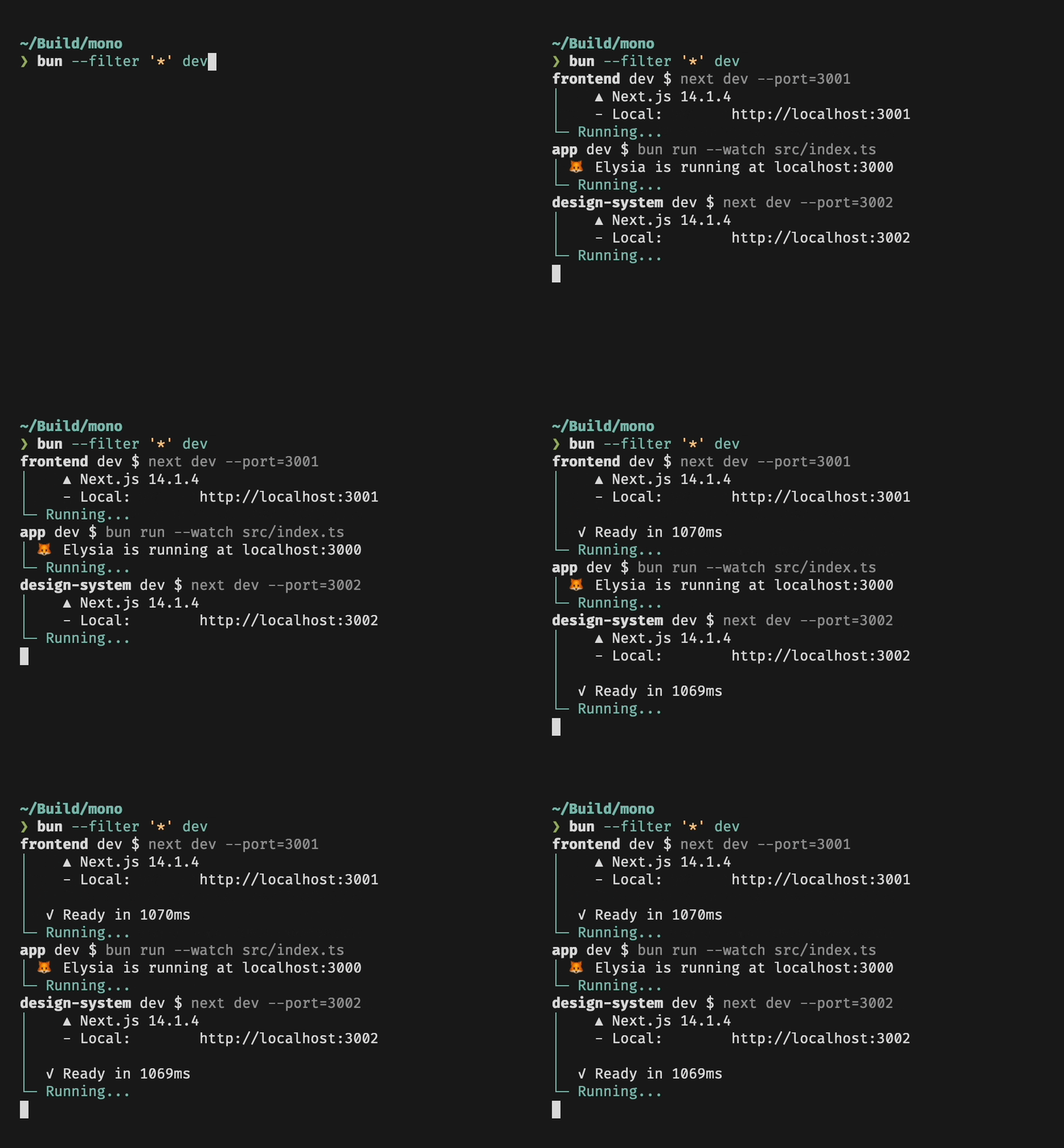</Frame>
|
|
|
|
The other pattern forms work the same way:
|
|
|
|
```bash terminal icon="terminal"
|
|
# build web and everything it depends on, in dependency order
|
|
bun --filter 'web...' build
|
|
|
|
# test the packages that depend on ui
|
|
bun --filter '...^ui' test
|
|
|
|
# run dev in every package under packages/apps
|
|
bun --filter '{./packages/apps}' dev
|
|
|
|
# lint every package except docs
|
|
bun --filter '*' --filter '!docs' lint
|
|
```
|
|
|
|
Only a `./path` pattern can select a `package.json` without a `name`. If no selected package has the script, `bun run` exits with an error (pass `--if-present` to exit 0 instead).
|
|
|
|
### Running scripts in workspaces
|
|
|
|
Filters respect your [workspace configuration](/pm/workspaces): if your `package.json` specifies which packages are part of the workspace,
|
|
`--filter` only matches those packages. In a workspace, `--filter` can also run scripts in packages located anywhere in the workspace:
|
|
|
|
```bash terminal icon="terminal"
|
|
# Packages
|
|
# src/foo
|
|
# src/bar
|
|
|
|
# in src/bar: runs myscript in src/foo, no need to cd!
|
|
bun run --filter foo myscript
|
|
```
|
|
|
|
### Parallel and sequential mode
|
|
|
|
Combine `--filter` or `--workspaces` with `--parallel` or `--sequential` to run scripts across workspace packages with Foreman-style prefixed output:
|
|
|
|
```bash terminal icon="terminal"
|
|
# Run "build" in all matching packages concurrently
|
|
bun run --parallel --filter '*' build
|
|
|
|
# Run "build" in all workspace packages sequentially
|
|
bun run --sequential --workspaces build
|
|
|
|
# Run glob-matched scripts across all packages
|
|
bun run --parallel --filter '*' "build:*"
|
|
|
|
# Continue running even if one package's script fails
|
|
bun run --parallel --no-exit-on-error --filter '*' test
|
|
|
|
# Run multiple scripts across all packages
|
|
bun run --parallel --filter '*' build lint
|
|
```
|
|
|
|
Bun prefixes each line of output with the package and script name (`pkg-a:build | ...`). Without `--filter`/`--workspaces`, the prefix is only the script name (`build | ...`). When a package's `package.json` has no `name` field, Bun uses the relative path from the workspace root instead.
|
|
|
|
Use `--if-present` with `--workspaces` to skip packages that don't have the requested script instead of erroring.
|
|
|
|
### Dependency Order
|
|
|
|
Bun respects package dependency order when running scripts. Say you have a package `foo` that depends on another package `bar` in your workspace, and both have a `build` script. When you run `bun --filter '*' build`, `foo` only starts once `bar` is done.
|