
116 lines
9.1 KiB
Plaintext
116 lines
9.1 KiB
Plaintext
---
|
|
title: "JSX"
|
|
description: "Built-in JSX and TSX support in Bun with configurable transpilation options"
|
|
---
|
|
|
|
Bun supports `.jsx` and `.tsx` files. Bun's internal transpiler converts JSX syntax into vanilla JavaScript before execution.
|
|
|
|
```ts react.tsx icon="/icons/typescript.svg"
|
|
function Component(props: {message: string}) {
|
|
return (
|
|
<body>
|
|
<h1 style={{color: 'red'}}>{props.message}</h1>
|
|
</body>
|
|
);
|
|
}
|
|
|
|
console.log(<Component message="Hello world!" />);
|
|
```
|
|
|
|
## Configuration
|
|
|
|
Bun reads your `tsconfig.json` or `jsconfig.json` to determine how to perform the JSX transform internally. If you'd rather not use either, you can set the same options in [`bunfig.toml`](/runtime/bunfig).
|
|
|
|
Bun respects the following compiler options.
|
|
|
|
### [`jsx`](https://www.typescriptlang.org/tsconfig#jsx)
|
|
|
|
How Bun transforms JSX constructs into vanilla JavaScript internally. The following table lists the possible values of `jsx`, along with how each transpiles this JSX component:
|
|
|
|
```tsx
|
|
<Box width={5}>Hello</Box>
|
|
```
|
|
|
|
| Compiler options | Transpiled output |
|
|
| --------------------------------------------------- | --------------------------------------------------------------------------------------------------------------------------------------------------------------------------------------------------------------------------------------------------------------------------------------------------------------------------------------------------------------------------------------------------------------------- |
|
|
| `json<br/>{<br/> "jsx": "react"<br/>}<br/>` | `tsx<br/>React.createElement(Box, { width: 5 }, "Hello");<br/>` |
|
|
| `json<br/>{<br/> "jsx": "react-jsx"<br/>}<br/>` | `tsx<br/>import { jsx } from "react/jsx-runtime";<br/>jsx(Box, { width: 5, children: "Hello" });<br/>` |
|
|
| `json<br/>{<br/> "jsx": "react-jsxdev"<br/>}<br/>` | `tsx<br/>import { jsxDEV } from "react/jsx-dev-runtime";<br/>jsxDEV(<br/> Box,<br/> { width: 5, children: "Hello" },<br/> undefined,<br/> false,<br/> undefined,<br/> this,<br/>);<br/>`<br/><br/>The `jsxDEV` variable name is a React convention. The `DEV` suffix marks code intended for development. The development version of React is slower and includes additional validity checks & debugging tools. |
|
|
| `json<br/>{<br/> "jsx": "preserve"<br/>}<br/>` | `tsx<br/>// JSX is not transpiled<br/>// "preserve" is not supported by Bun currently<br/><Box width={5}>Hello</Box><br/>` |
|
|
|
|
### [`jsxFactory`](https://www.typescriptlang.org/tsconfig#jsxFactory)
|
|
|
|
<Note>Only applicable when `jsx` is `react`.</Note>
|
|
|
|
The function name used to represent JSX constructs. Default value is `"React.createElement"`. Set this for libraries like [Preact](https://preactjs.com/) that use a different function name (`"h"`).
|
|
|
|
| Compiler options | Transpiled output |
|
|
| --------------------------------------------------------------------- | --------------------------------------------- |
|
|
| `json<br/>{<br/> "jsx": "react",<br/> "jsxFactory": "h"<br/>}<br/>` | `tsx<br/>h(Box, { width: 5 }, "Hello");<br/>` |
|
|
|
|
### [`jsxFragmentFactory`](https://www.typescriptlang.org/tsconfig#jsxFragmentFactory)
|
|
|
|
<Note>Only applicable when `jsx` is `react`.</Note>
|
|
|
|
The function name used to represent [JSX fragments](https://react.dev/reference/react/Fragment) such as `<>Hello</>`. Default value is `"React.Fragment"`.
|
|
|
|
| Compiler options | Transpiled output |
|
|
| ------------------------------------------------------------------------------------------------------------------- | ------------------------------------------------------------------------------------------------ |
|
|
| `json<br/>{<br/> "jsx": "react",<br/> "jsxFactory": "myjsx",<br/> "jsxFragmentFactory": "MyFragment"<br/>}<br/>` | `tsx<br/>// input<br/><>Hello</>;<br/><br/>// output<br/>myjsx(MyFragment, null, "Hello");<br/>` |
|
|
|
|
### [`jsxImportSource`](https://www.typescriptlang.org/tsconfig#jsxImportSource)
|
|
|
|
<Note>Only applicable when `jsx` is `react-jsx` or `react-jsxdev`.</Note>
|
|
|
|
The module the component factory function (such as `createElement`, `jsx`, or `jsxDEV`) is imported from. Default value is `"react"`. You typically need this when using a component library like Preact.
|
|
|
|
| Compiler options | Transpiled output |
|
|
| ---------------------------------------------------------------------------------------------------------------------- | ------------------------------------------------------------------------------------------------------------------------------------------------------------------------------------------------------------------------------------------------- |
|
|
| `jsonc<br/>{<br/> "jsx": "react-jsx",<br/> // jsxImportSource is not defined<br/> // default to "react"<br/>}<br/>` | `tsx<br/>import { jsx } from "react/jsx-runtime";<br/>jsx(Box, { width: 5, children: "Hello" });<br/>` |
|
|
| `jsonc<br/>{<br/> "jsx": "react-jsx",<br/> "jsxImportSource": "preact",<br/>}<br/>` | `tsx<br/>import { jsx } from "preact/jsx-runtime";<br/>jsx(Box, { width: 5, children: "Hello" });<br/>` |
|
|
| `jsonc<br/>{<br/> "jsx": "react-jsxdev",<br/> "jsxImportSource": "preact",<br/>}<br/>` | `tsx<br/>// /jsx-dev-runtime is automatically appended<br/>import { jsxDEV } from "preact/jsx-dev-runtime";<br/>jsxDEV(<br/> Box,<br/> { width: 5, children: "Hello" },<br/> undefined,<br/> false,<br/> undefined,<br/> this,<br/>);<br/>` |
|
|
|
|
### JSX pragma
|
|
|
|
You can set any of these values per file with a _pragma_, a comment that sets a compiler option in a particular file.
|
|
|
|
| Pragma | Equivalent config |
|
|
| ---------------------------------------- | ------------------------------------------------------------------ |
|
|
| `ts<br/>// @jsx h<br/>` | `jsonc<br/>{<br/> "jsxFactory": "h",<br/>}<br/>` |
|
|
| `ts<br/>// @jsxFrag MyFragment<br/>` | `jsonc<br/>{<br/> "jsxFragmentFactory": "MyFragment",<br/>}<br/>` |
|
|
| `ts<br/>// @jsxImportSource preact<br/>` | `jsonc<br/>{<br/> "jsxImportSource": "preact",<br/>}<br/>` |
|
|
|
|
## Logging
|
|
|
|
Bun implements special logging for JSX to help with debugging. Given the following file:
|
|
|
|
```tsx index.tsx icon="/icons/typescript.svg"
|
|
import { Stack, UserCard } from "./components";
|
|
|
|
console.log(
|
|
<Stack>
|
|
<UserCard name="Dom" bio="Street racer and Corona lover" />
|
|
<UserCard name="Jakob" bio="Super spy and Dom's secret brother" />
|
|
</Stack>,
|
|
);
|
|
```
|
|
|
|
Bun pretty-prints the component tree:
|
|
|
|
<Frame>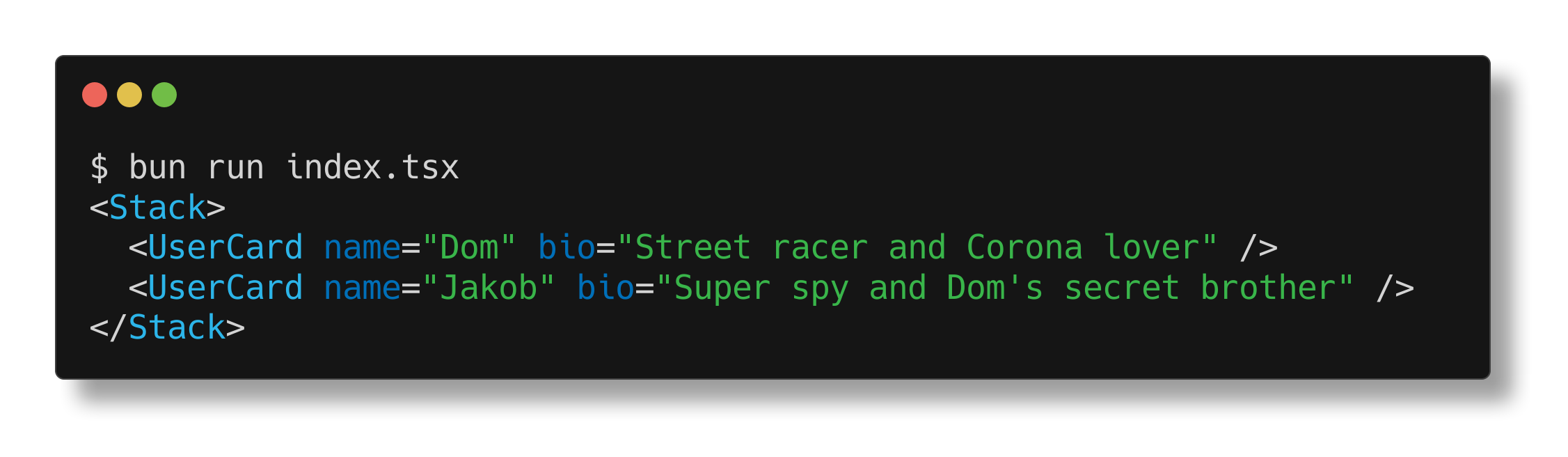</Frame>
|
|
|
|
## Prop punning
|
|
|
|
The Bun runtime also supports "prop punning" for JSX: a shorthand for assigning a variable to a prop with the same name.
|
|
|
|
```tsx react.tsx icon="/icons/typescript.svg"
|
|
function Div(props: {className: string;}) {
|
|
const {className} = props;
|
|
|
|
// without punning
|
|
return <div className={className} />;
|
|
// with punning
|
|
return <div {className} />;
|
|
}
|
|
```
|